Turn your photos into beautiful romantic images

Turn your photos into beautiful romantic images

Digital photography offers endless possibilities for transforming ordinary images into captivating visual stories. Sometimes, a photograph needs a touch of artistry to convey a specific mood or emotion, such as a romantic or dreamy atmosphere.

This tutorial explores techniques to imbue your photographs with a dreamy, romantic ambiance, perfect for portraits or personal memories. You will learn how to apply color adjustments, add soft light, incorporate bokeh effects, and personalize your images with custom text.

Watch the Full Tutorial

Video by Blue Lightning. Any links or downloads mentioned by the creator are available only on YouTube

Understanding the Elements of Romantic Photo Enhancement

Achieving a romantic aesthetic in photography often relies on manipulating light and color to evoke specific emotions. Key elements include soft, diffused lighting, warm color palettes, and a gentle blurring of backgrounds to draw focus to the subject. These visual cues collectively contribute to a sense of intimacy and warmth within the image.

In Photoshop, tools such as Gradient Maps and Levels adjustments are instrumental in shaping these visual characteristics. A gradient map can infuse an image with a custom color overlay, while levels control the tonal range, allowing for subtle enhancements to highlights and shadows. These adjustments can transform the overall mood of a photograph by shifting its color temperature and contrast.

The addition of elements like bokeh lights further contributes to this dreamy atmosphere, creating luminous, out-of-focus highlights that mimic natural lens effects. These combined techniques transform standard photos into compositions that convey warmth, intimacy, and a sense of timeless beauty.

Practical Tips for Romantic Photo Effects

  • Utilize a Gradient Map with Screen blend mode to introduce a soft, color-shifted overlay, enhancing the overall mood.
  • Adjust Levels by slightly darkening blacks and lightening midtones to refine contrast and brighten the image selectively.
  • Add a warm, soft light source using a large, soft brush on a new layer set to Screen blend mode, strategically placed near your subject.
  • Incorporate Bokeh lights by pasting them onto your document and setting their blend mode to Screen, adding luminous depth.
  • Apply an Outer Glow effect to text, using a white color and Screen blend mode, to make it stand out against the romantic background.

More Tutorials about Romantic Photo Effects

Explore additional resources to deepen your understanding of photo manipulation and creative editing techniques.
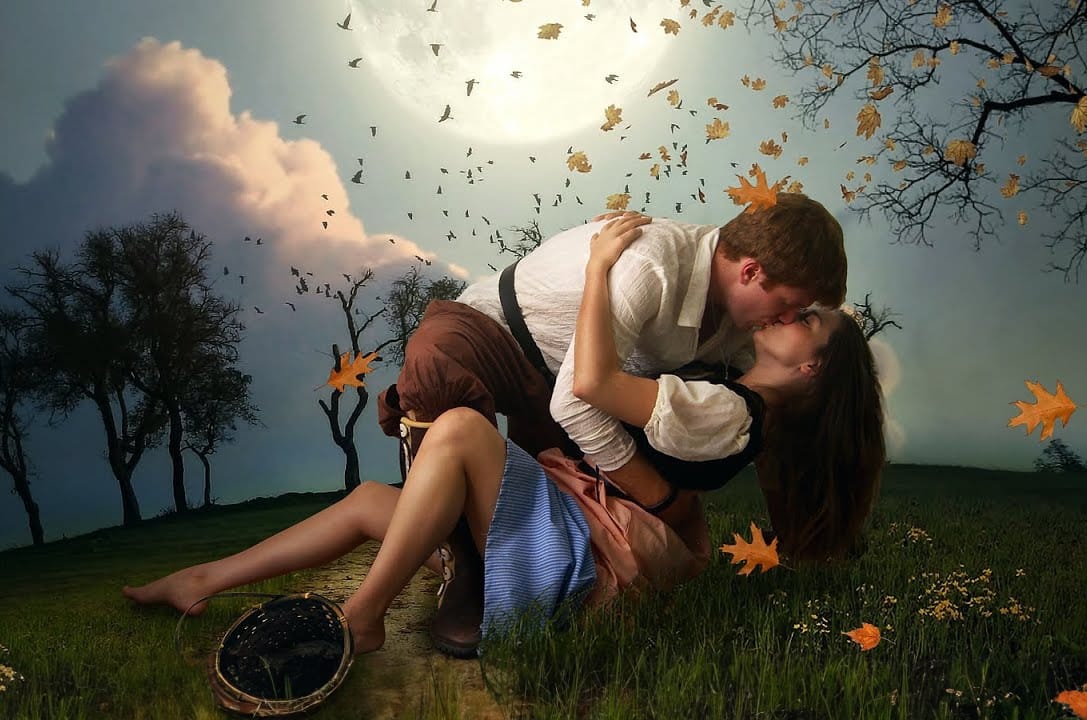

Create a Beautiful Romantic Scene With a Dreamy Surreal Style in Photoshop
In this Photoshop tutorial presented by Andrei Oprinca from PSD Box, you will learn to create a stunning romantic scene featuring a couple in a greenfield surrounded by flowers and birds. This project is designed to inspire creativity and improve your photo manipulation skills. The tutorial is accessible to both beginners and advanced users, making it a great resource for anyone looking to enhance their Photoshop techniques. Oprinca guides you through each step, ensuring that you can follow alo
Create a Romantic Sunrise Effect in Photoshop
In this tutorial, you will explore how to create a beautiful romantic sunrise effect in Photoshop. Suitable for those with intermediate skills, this guide provides clear steps to achieve a stunning image of a couple embracing while watching a sunrise. You will learn to manipulate lighting conditions to perfectly capture the essence of the moment. By using layer styles and adjustment layers, you’ll be able to transform your image into a captivating scene. This process not only enhances your edi
How to make your photos look better FAST in Photoshop
Peter McKinnon, a talented photographer and instructor, shares his expertise on how to make your photos look better quickly in Photoshop. In this tutorial, he guides viewers through various techniques to help their images pop, stand out, and generally improve in a short amount of time. The author explains that if you're looking to elevate your editing skills and dive into the world of Photoshop, this video is a must-watch. He provides valuable insights and practical tips that can help viewers t
How to make any photo look better in seconds in Photoshop
Many photographs, despite good composition, can often lack that captivating polish or depth. Achieving a professional and visually appealing aesthetic often seems like a complex or time-consuming endeavor for photographers and digital artists. This tutorial introduces a simple yet powerful Photoshop technique, sometimes referred to as the "euro glow" or "euro tint," designed to quickly elevate the quality of any image. Readers will learn how a few clicks can add contrast, vibrance, and a subtle

Get tutorials & freebies delivered to you.

Subscribe to the Photoshop Roadmap newsletter, a weekly roundup of new tutorials, insights and quality downloads, trusted by 6500+ readers.

You might also like

How to Use the 3D Object Rotation Tool in Photoshop Beta

Adobe's new Rotate Object feature transforms flat 2D images into interactive 3D models that can be repositioned from any angle. This AI-powered tool automatically creates cutouts, maintains original textures, and generates missing details when objects are rotated beyond their original perspective. The feature opens new possibilities for product...

How to Create Stretched Perspective Text Effects in Photoshop

Stretched perspective text creates dramatic visual depth by transforming flat typography into architectural-style elements that appear to recede into space. This trendy effect, popular in poster design, gives text a building-like appearance with multiple vanishing points. The technique involves manually cutting, duplicating, and connecting text segments using selection tools and...

How to Add Selective Contrast and Clarity Using Camera Raw Filter

Many photos lack the visual impact they could have simply because contrast and clarity are applied uniformly across the entire image. The key to professional-looking results lies in selectively enhancing specific areas that deserve attention while leaving others untouched. This approach uses the Camera Raw filter's histogram controls...

35 Artistic Photoshop Effects Tutorials and Actions That Actually Look Good

Creating illustration effects from a photo has never been easier. AI tools can generate a sketch, a painting, or a cartoon version in seconds, and the first result can look surprisingly good. The problem is control. Even with conversational AI models (like ChatGPT or Gemini Nano Banana) that let you...

How to Create Digital Collages Using Layers and Blend Modes in Photoshop

Digital collages combine multiple images through strategic layering and blending techniques to create compelling visual stories. This beginner-friendly approach demonstrates how to build complex compositions by layering textures, portraits, and objects while using blend modes to seamlessly integrate each element. The process focuses on practical workflow techniques including smart object...

Building Complex Composites Using Generative Fill and Layer Blending

Complex surreal composites require more than just combining random images. The key to professional results lies in systematic layering, consistent masking techniques, and building a reusable library of generated elements. This approach transforms scattered AI-generated content into cohesive artistic visions. The tutorial demonstrates how to deconstruct an existing composite to...

You’ve successfully subscribed to Photoshop Roadmap
Welcome back! You’ve successfully signed in.
Great! You’ve successfully signed up.
Success! Your email is updated.
Your link has expired
Success! Check your email for magic link to sign-in.